Privacy Policy
The Privacy Policy settings page allows admins to manage the privacy policy content that users see in the web app. This page is useful for keeping legal, contact, and data-protection information up to date from the admin panel.
- Admin privacy policy page:
https://admin.acusolo.net/admin/app-settings/privacy-policy - Web app privacy policy page:
https://web.acusolo.net/settings/privacy-policy
Manage privacy policy
Admins can update the privacy policy from the application settings area.
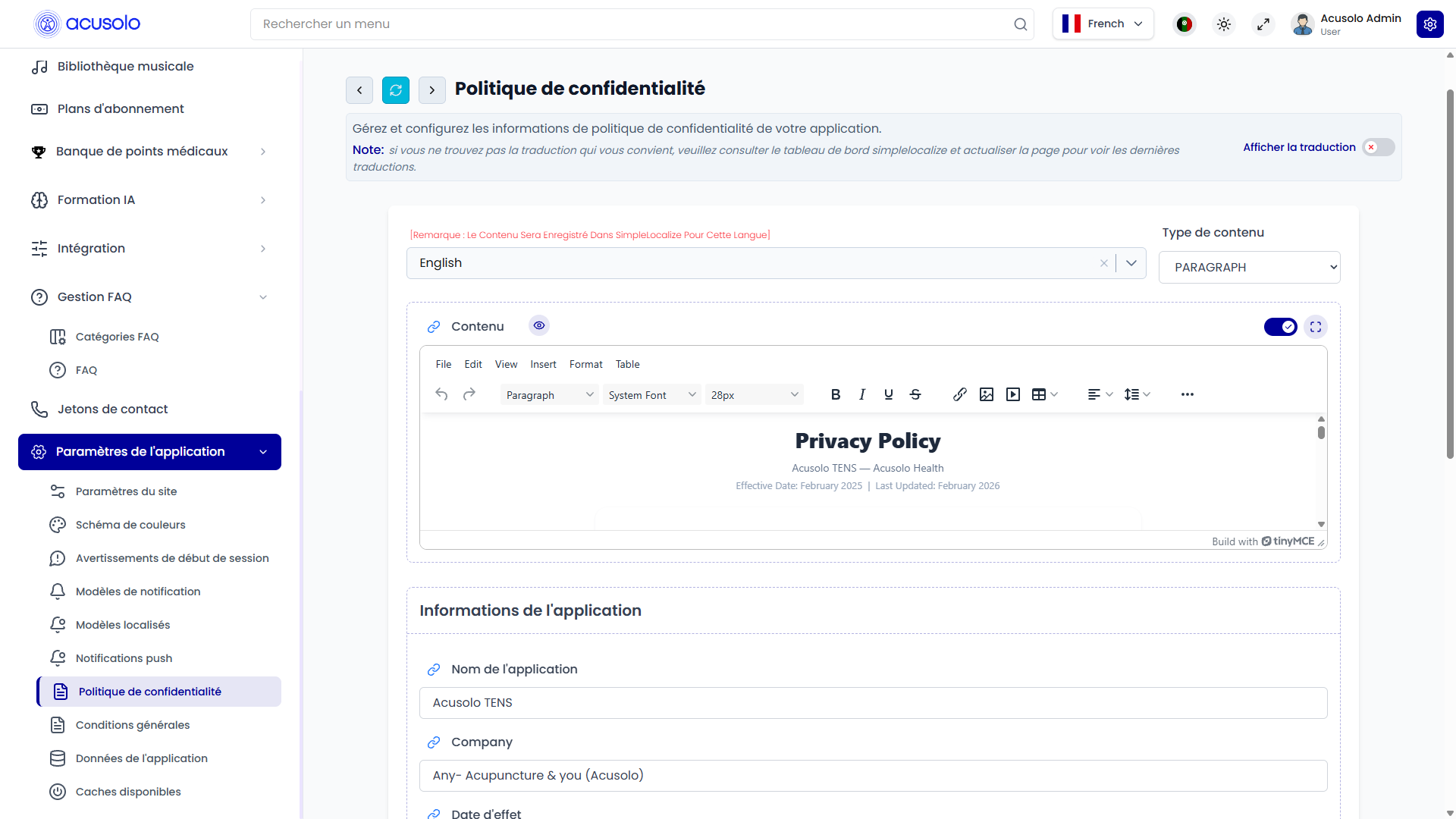
The page includes:
- Language selection.
- Content type selection.
- Privacy policy content.
- Application information.
- Data Protection Officer information.
- Contact information.
- Reset and save actions.
Language selection
The language selector controls which language version is being edited.
When the admin changes the language, the page loads the saved privacy policy content for that language if available. If the selected language does not already have translated content, the admin can create or update it from this page.
The note on the page reminds admins that the content is saved for the selected language. After updating translations, admins should refresh or reload the page to see the latest language content.
Content type
The Content Type field controls how the privacy policy is built and displayed.
| Content type | Meaning |
|---|---|
| PARAGRAPH | The admin writes the full privacy policy as one rich content block. This is useful for a traditional long-form privacy policy page. |
| ACCORDION | The admin selects FAQ categories. The selected categories become expandable privacy policy sections in the web app. |
Paragraph content
When PARAGRAPH is selected, the page shows a content editor.
Admins can use this editor to write the full privacy policy text, format headings, add lists, and structure the page content. The saved content becomes the main privacy policy body shown to users.
This mode is best when the privacy policy should be managed as one complete document.
Accordion content
When ACCORDION is selected, the page lets admins select FAQ categories for the privacy policy.
Selected categories become expandable sections on the web app privacy policy page. The category order follows the category serial/order value already configured in FAQ Management.
This mode is best when the privacy policy should be split into clear sections such as data collection, user rights, contact details, retention, permissions, and similar policy topics.
Before using this mode, admins should prepare the required FAQ categories and FAQ items in FAQ Management.
Application information
The Application Information section controls the main identity and summary details displayed with the privacy policy.
| Field | Meaning |
|---|---|
| App Name | The application or service name shown with the privacy policy. |
| Company | The company or organization responsible for the privacy policy. |
| Effective Date | The date from which the privacy policy becomes active. |
| Description | A short privacy summary or explanation shown with the policy information. |
| Office Address | The official office or business address. |
These fields help users understand which product and company the privacy policy belongs to.
Data Protection Officer
The Data Protection Officer (DPO) section stores the privacy contact person details.
| Field | Meaning |
|---|---|
| DPO Name | Name of the responsible privacy or data-protection contact. |
| DPO Email | Email address users can use for privacy or data-protection questions. |
Admins should keep this information accurate because users may rely on it for privacy requests.
Contact information
The Contact Information section stores the general contact details shown with the privacy policy.
| Field | Meaning |
|---|---|
| Contact Email | Support or contact email for privacy-policy related communication. |
| Contact Phone | Phone number for user support or policy-related contact. |
Web app preview
Users can view the saved privacy policy from the web app settings area.
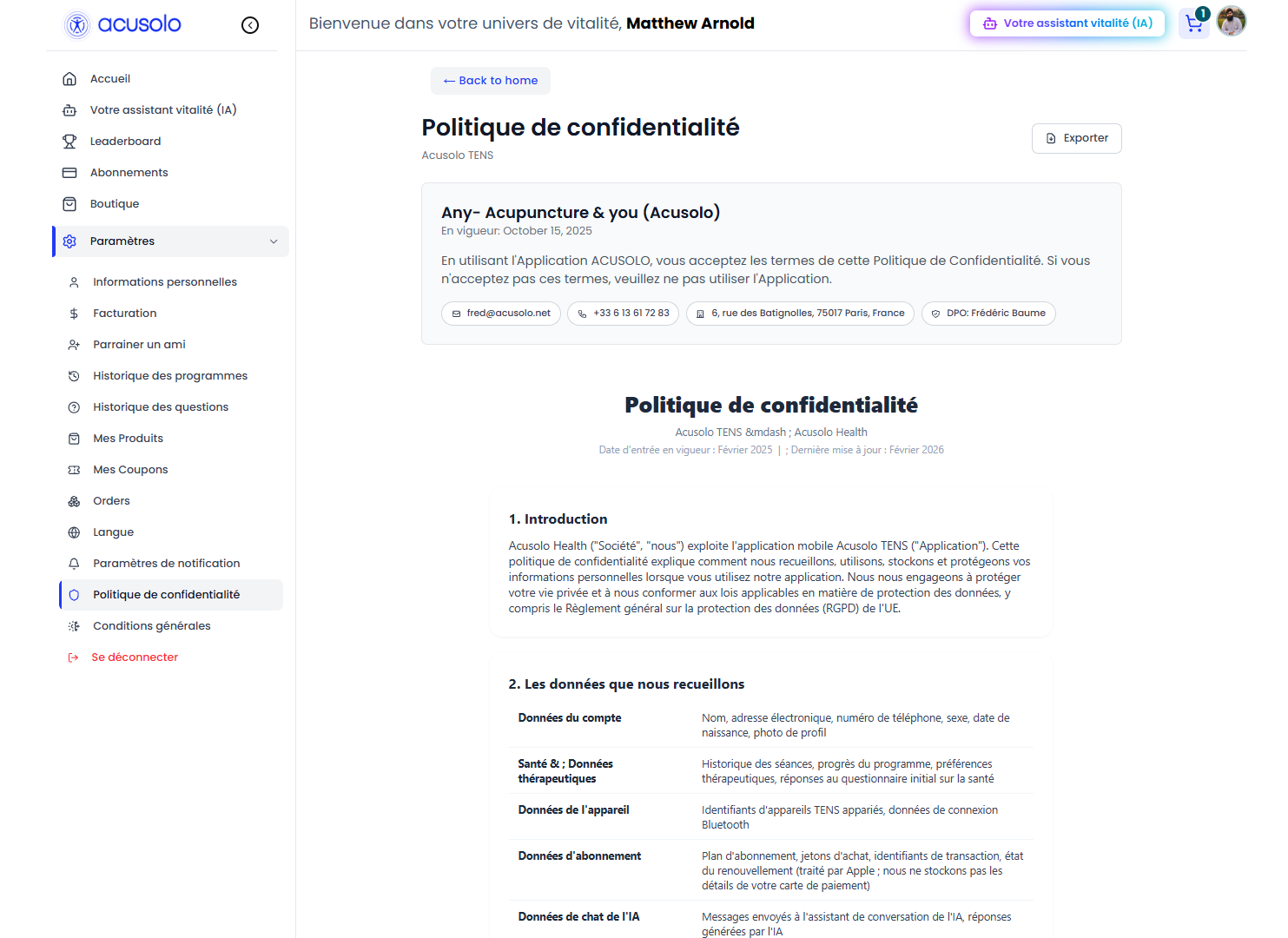
On the web app:
- Paragraph content appears as the full privacy policy body.
- Accordion content appears as expandable privacy policy sections.
- Accordion sections are ordered by their configured serial/order value.
- The first accordion section can open by default.
- Application information can appear with the policy in the settings view.
- If no privacy policy content is available, users see an unavailable or empty-content message.
Reset and save behavior
| Action | Meaning |
|---|---|
| Reset | Restores the form to the last loaded values. It does not permanently change anything by itself. |
| Save Changes | Saves the selected language, content type, content, selected FAQ categories, and application/contact information. |
After saving, users may need to refresh or revisit the privacy policy page before seeing the latest updates.
Important rules
- Select the correct language before editing.
- Choose PARAGRAPH when the policy should be one complete document.
- Choose ACCORDION when the policy should be built from FAQ categories.
- For accordion content, only active and properly prepared FAQ categories should be selected.
- Category serial/order values affect the order users see on the web app.
- Keep App Name, Company, Effective Date, DPO, and Contact Information accurate.
- Review the web app preview after saving important policy changes.
- Avoid deleting FAQ categories that are currently used by the privacy policy.
Common error cases
Admins may face these issues:
- The wrong language was selected before saving.
- The privacy policy appears empty because no content was saved for the selected language.
- Accordion mode appears empty because no FAQ categories were selected.
- A selected FAQ category has no active content.
- The web app still shows old content until the page is refreshed.
- Contact or DPO information is outdated.
- Category order looks incorrect because serial/order values were not planned.
Overall flow
- Admin opens the Privacy Policy settings page.
- Admin selects the language to edit.
- Admin chooses Paragraph or Accordion content.
- Admin writes the policy content or selects FAQ categories.
- Admin updates application, DPO, and contact information.
- Admin saves the changes.
- Users view the updated privacy policy from the web app settings page.