Coupon Management
Coupons are created from the admin panel and can be used by customers during subscription checkout, product purchase, and cart checkout. The backend owns validation and discount calculation; the frontend sends the coupon code and displays the validated result returned by the API.
- Admin coupon list:
https://admin.acusolo.net/admin/coupons - Web cart checkout:
https://web.acusolo.net/cart - Web accessories/store purchase:
https://web.acusolo.net/accessories - Web plans purchase:
https://web.acusolo.net/plans
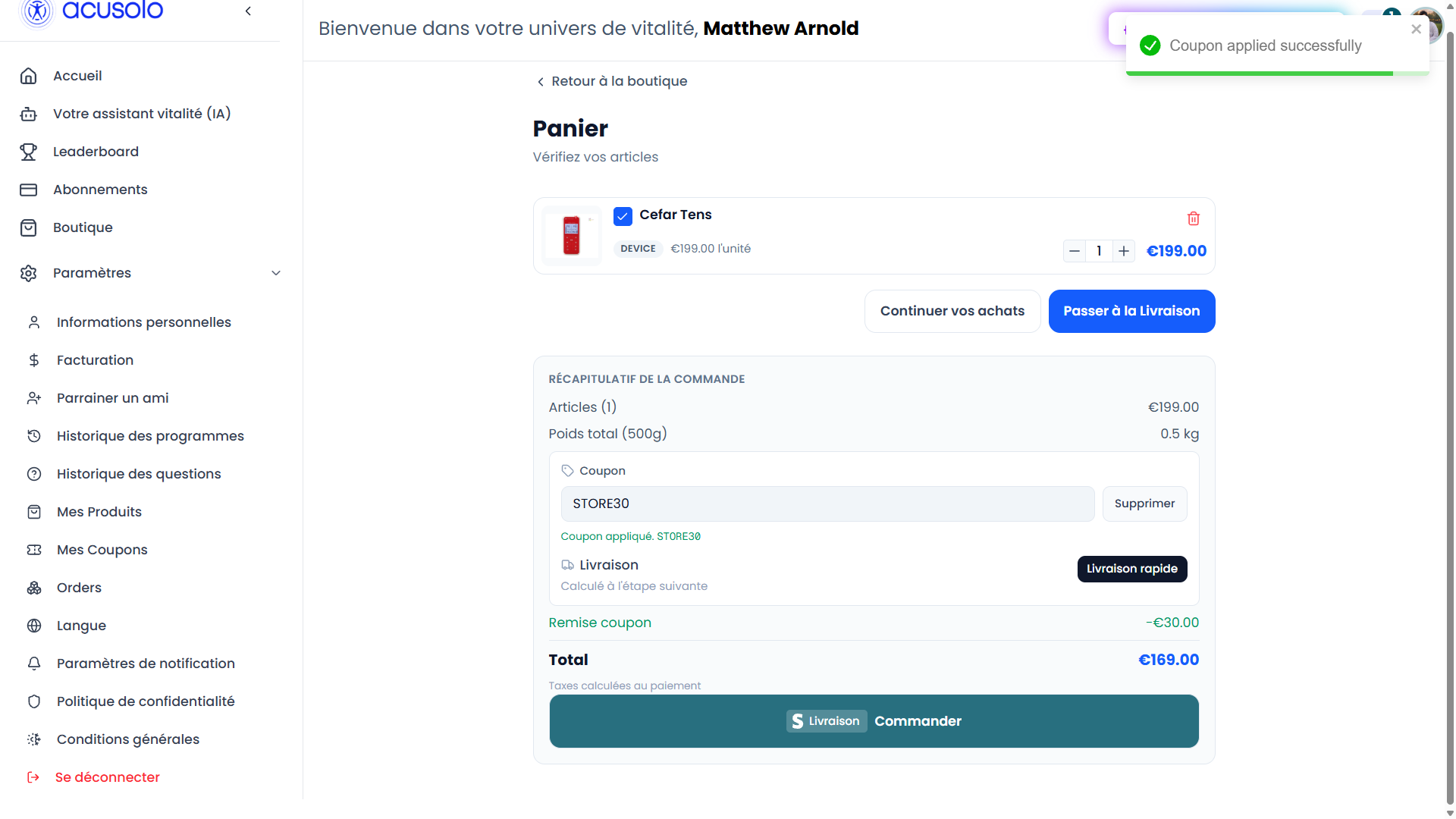
Web cart coupon example
On the cart page, a user can enter a coupon code before Stripe checkout. If the coupon is valid, the backend calculates the discount and the Stripe checkout amount is adjusted before payment.
Coupons can apply to:
- Subscription plan payments from the plans flow.
- Product purchases from the store/accessories flow.
- Cart checkout payments from the cart page.
Admin coupon list
Open https://admin.acusolo.net/admin/coupons to manage all coupons.
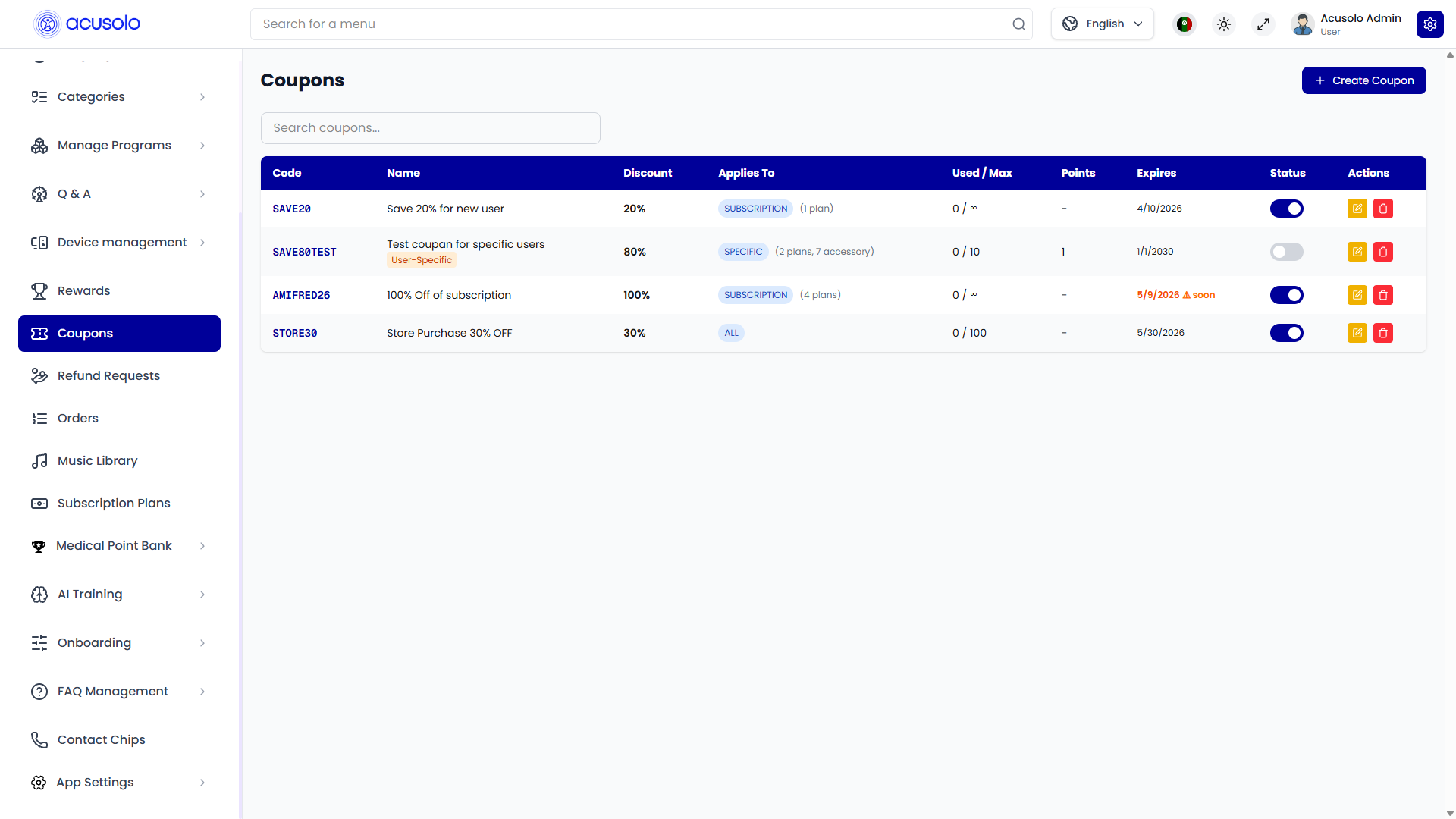
The list is powered by GET /admin/coupon/all with pagination and search. The table shows code, name, discount, scope, usage count, points requirement, expiry, status, and actions.
Admin actions
- Create Coupon opens the create modal.
- Edit opens the edit modal with the selected coupon data.
- Delete removes the coupon from the database and deactivates/removes the Stripe coupon references.
- Status toggle updates the local
activeflag and syncs the Stripe promotion code active state. - Search filters by coupon name, code, or description.
The admin frontend uses RTK Query in couponApi: create/update/delete invalidate the coupon list, while status changes optimistically patch all cached coupon lists and roll back if the API fails.
Create coupon
Click Create Coupon to open the modal.
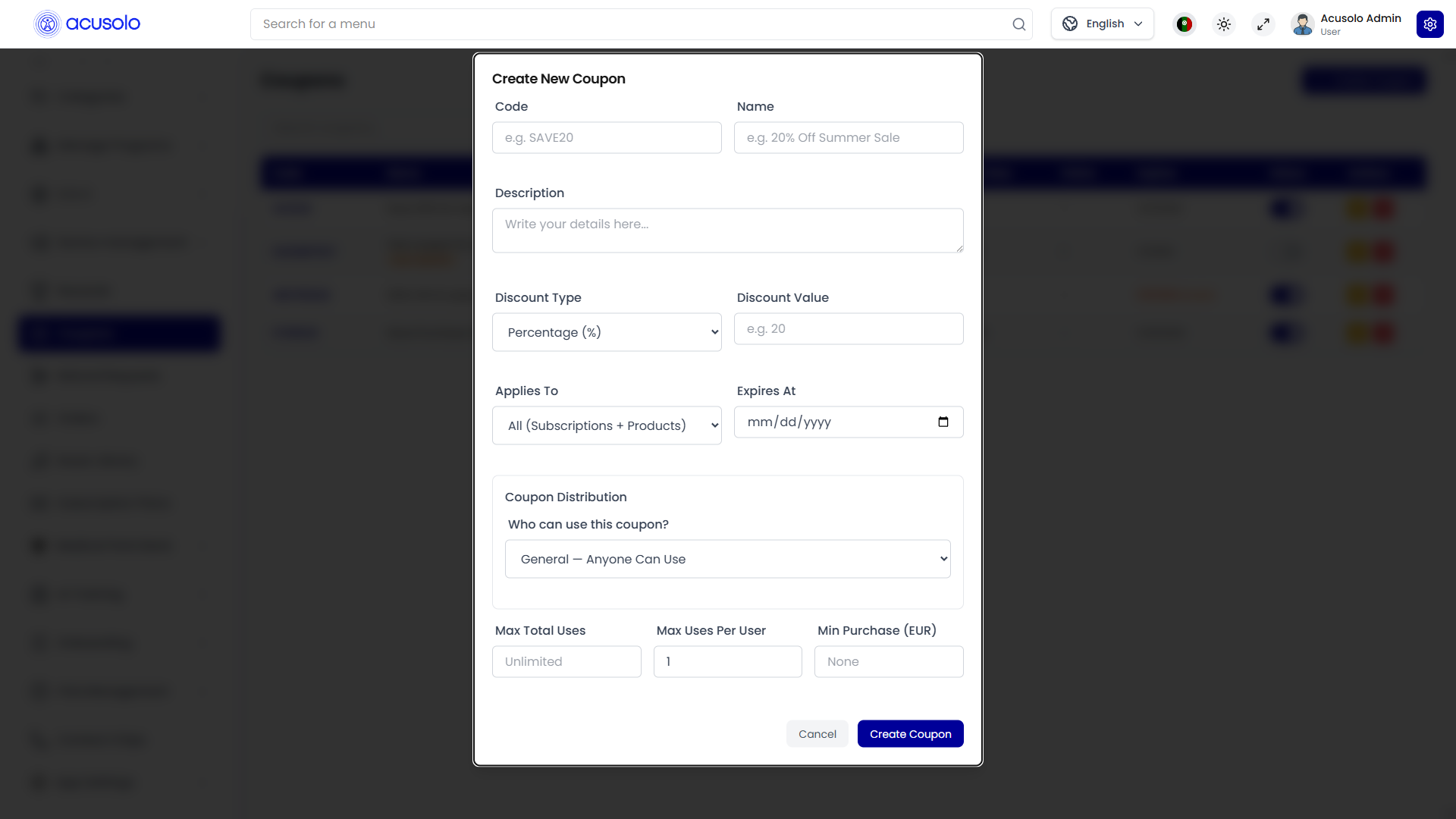
Required fields
| Field | Meaning |
|---|---|
| Code | Required coupon code. The admin UI uppercases it before submit. Must be unique in the backend and cannot exceed 255 characters. |
| Name | Required display/admin name. Used as the Stripe coupon name. |
| Discount Type | Required. PERCENTAGE or FIXED_AMOUNT. |
| Discount Value | Required positive number. Percentage values are blocked in the frontend if greater than 100. Fixed amount is treated as EUR by the UI. |
Optional fields
| Field | Meaning |
|---|---|
| Description | Admin-facing description stored with the coupon. |
| Applies To | Scope for where the coupon can apply: ALL, SUBSCRIPTION, PRODUCT, or SPECIFIC. |
| Expires At | Optional expiry date. Expired coupons are rejected by backend validation. |
| Select Subscription Plans | Shown for SUBSCRIPTION and SPECIFIC. Empty means all subscriptions for SUBSCRIPTION; required when SPECIFIC relies on plan targets. |
| Select Devices | Shown for PRODUCT and SPECIFIC. Empty means all devices for PRODUCT; specific IDs restrict eligible device lines. |
| Select Accessories | Shown for PRODUCT and SPECIFIC. Empty means all accessories for PRODUCT; specific IDs restrict eligible accessory lines. |
| Coupon Distribution | Who can use the coupon: GENERAL, POINTS_REDEEMABLE, or USER_SPECIFIC. |
| Allowed User Emails | Only for USER_SPECIFIC. Comma/newline separated email allow-list. |
| Points Required to Redeem | Only for POINTS_REDEEMABLE. Required in the UI for that distribution type. |
| Max Total Uses | Global redemption cap. Synced to Stripe max redemptions when the coupon is created. |
| Max Uses Per User | Per-user completed checkout cap. Defaults to 1 in create flow. |
| Min Purchase (EUR) | Minimum eligible amount before the coupon can be applied. |
Scope options
| Option | Behavior |
|---|---|
| All (Subscriptions + Products) | Can apply to subscriptions, devices, and accessories. Shipping lines are not discounted. |
| Subscriptions Only | Applies only to subscription line items; selected plan IDs can narrow the eligible plans. |
| Products Only | Applies only to device/accessory line items; selected device/accessory IDs can narrow eligible products. |
| Specific Items | Requires at least one selected plan, device, or accessory in backend validation. Only those selected items are eligible. |
Distribution options
| Option | Behavior |
|---|---|
| General | Any eligible user can apply the coupon until limits, expiry, or status block it. |
| Points Redeemable | User must already have a coupon redemption/reservation before checkout can use it. If a Stripe session expires, the backend refunds the reserved points and removes the reservation. |
| User Specific | Backend compares the signed-in user's email with allowedUserEmails. Non-listed users are rejected. |
What happens after creation
The backend POST /admin/coupon validates unique code, creates a Stripe coupon, creates/reactivates a Stripe promotion code, then stores the coupon with Stripe IDs in the database. Percentage coupons use percent_off; fixed amount coupons use amount_off in cents.
Edit coupon
Click the edit button from the coupon list to open the edit modal.
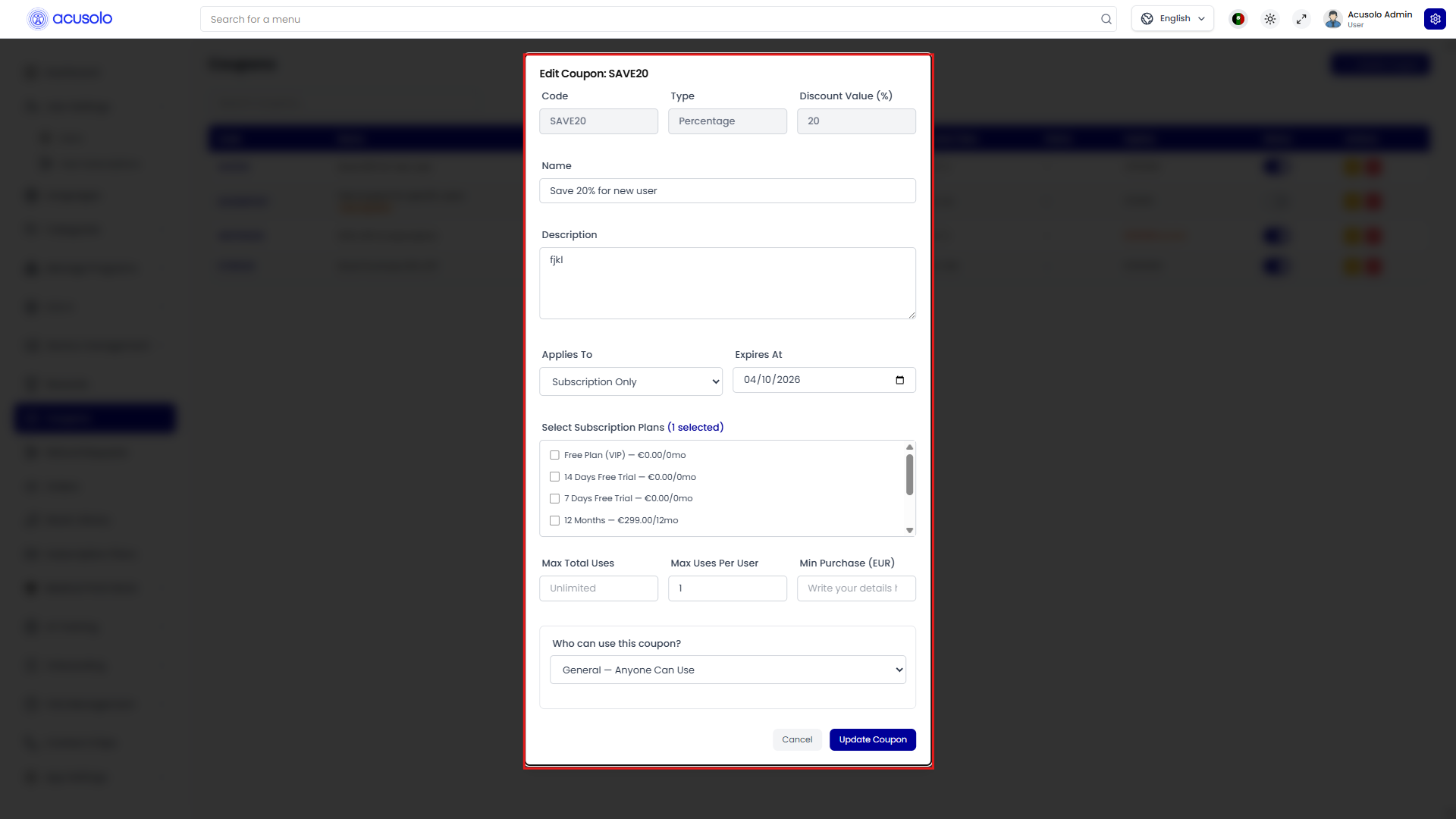
The modal is pre-filled from the selected row data. Code, Type, and Discount Value are displayed but disabled in the current admin UI. Editable fields include name, description, applies-to scope, expiry, selected plans/devices/accessories, max uses, max uses per user, minimum purchase, distribution type, allowed user emails, and points required.
Status is changed from the list toggle, not inside the edit modal. Turning a coupon off makes it unusable in checkout and deactivates the Stripe promotion code.
Updated rules affect future validation and future payment sessions. Existing completed payments are not recalculated.
Backend validation
Coupon checks happen server-side before the frontend treats a coupon as applied.
Apply coupon endpoint
GET /payment/apply-coupon/:codeOrId validates:
- Code or ID exists and is active.
- Coupon is not expired.
- Global
maxUseshas not been reached. - User exists.
USER_SPECIFICemail allow-list includes the user.POINTS_REDEEMABLEhas an existing redemption/reservation.maxUsesPerUserhas not been reached for completed checkouts.- Stripe coupon and promotion code references are still valid and active when present.
The response returns coupon ID, code, discount value, currency, and currency symbol. The frontend should show that validated result and not invent its own coupon status.
Cart checkout validation
POST /payment/cart-checkout validates the submitted cart, shipping option, and coupon again before creating Stripe checkout. It rejects invalid cart totals, inactive/expired coupons, and minimum-purchase failures.
For cart checkout, the backend computes the discount from the cart subtotal:
PERCENTAGE: subtotal multiplied by the percentage.FIXED_AMOUNT: fixed amount capped at the subtotal.- Discount never goes below
0or above the cart subtotal. - Shipping is added after the discounted cart subtotal.
- Stripe receives adjusted line-item amounts, so the user pays the discounted total.
The order stores couponId, coupon data in metadata, and discountAmount.
Subscription/product checkout validation
The wallet payment-link flow accepts an optional couponCode. It validates the coupon, then applies it to eligible checkout line items for subscription checkouts. Eligibility follows appliesTo and selected target IDs from metadata. Shipping is excluded from discount eligibility.
For non-subscription product payment links, the current backend expects the frontend amount to already be post-discount and does not re-apply the coupon again.
Stripe and usage tracking
Admin coupon create/update/status/delete operations sync to Stripe coupon or promotion-code records. Checkout sessions carry couponCode in metadata where applicable.
On checkout.session.completed, the Stripe webhook records coupon usage in coupon_redemptions and increments Coupon.usedCount. This tracking applies across subscription and payment checkout modes. For points-redeemable coupons, the webhook converts the reserved redemption into a completed redemption by attaching the Stripe session ID.
Error cases
The user should expect a rejection message when:
- Coupon code is missing or not found.
- Coupon is inactive or expired.
- Stripe coupon/promotion-code sync is invalid.
- Global usage limit or per-user usage limit is reached.
- Minimum purchase amount is not met.
- User-specific coupon is used by a non-allowed email.
- Points-redeemable coupon was not redeemed/reserved first.
- Specific-item coupon has no eligible line item in the checkout.
Usage flow
- Admin creates a coupon from
https://admin.acusolo.net/admin/coupons. - Backend stores it and syncs it to Stripe.
- User enters the coupon in cart, product, or subscription checkout.
- Backend validates the coupon and target rules.
- Backend calculates the discount for eligible items.
- Stripe checkout is created with the discounted amount.
- After successful payment, the Stripe webhook records redemption usage.